Gain more time, take charge of your workday

Drive Results with Expert-Led Training and Coaching to Maximize Productivity with Proven Processes and Technology, right at your desk.

Some of the Leading Companies and Organisations that have Benefitted from our Training

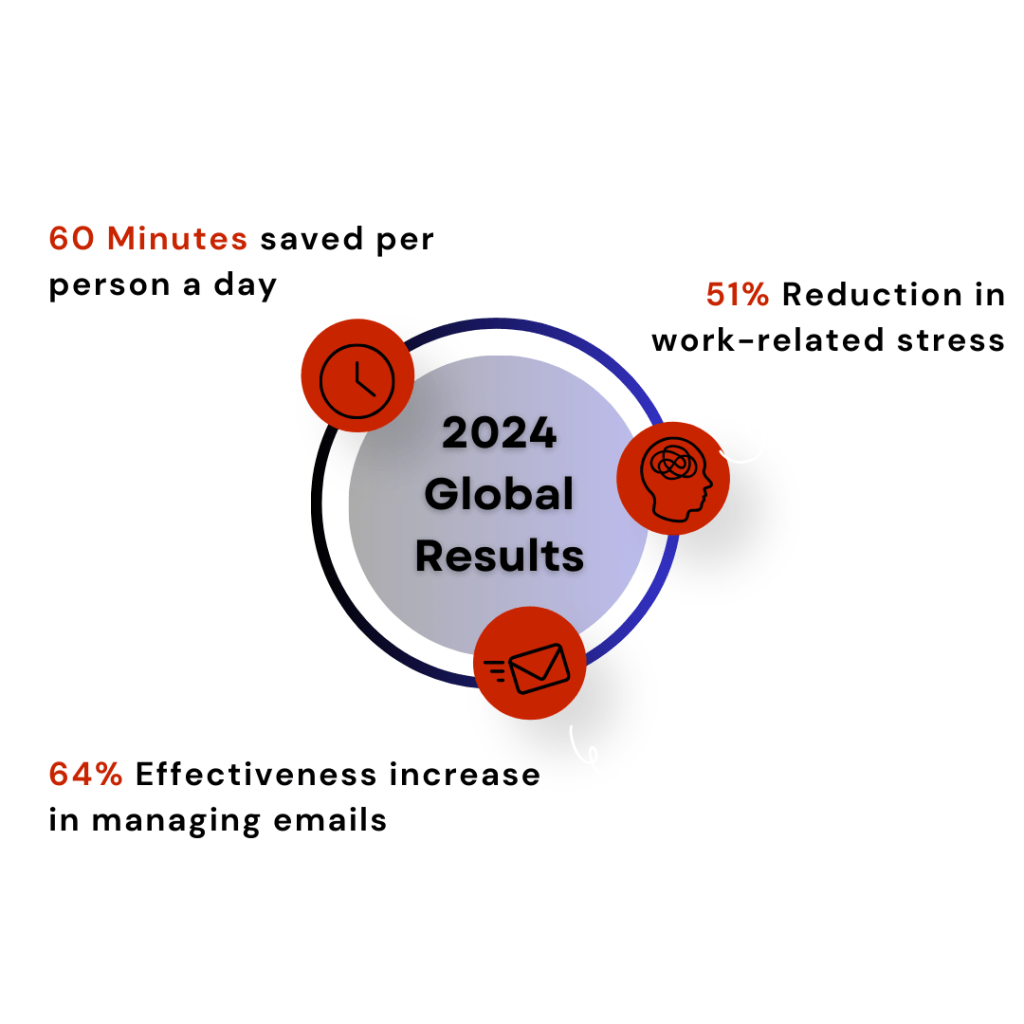
RESULTS SPEAK LOUDER THAN WORDS

Why Choose Us?

  • Practical Solutions for Modern Workplaces
    Our training integrates seamlessly with MS 365 tools like Outlook, Teams, & OneNote, making it easy to adopt & immediately impactful for day-to-day workflows.
  • Customizable and Scalable Programs
    Whether you’re a small team or a large organization, our training is tailored to meet your specific needs and scaled to drive consistent results across teams.
  • Transform Hesitation into Confidence
    We address technology fears head-on, empowering individuals to embrace new tools and techniques with confidence and enthusiasm, leading to smoother transitions and greater adoption.
  • Focus on Real-World Application
    We prioritize actionable strategies that help teams manage workloads, reduce stress, and achieve measurable productivity gains—skills that deliver results from day one.
  • Sustainable Results with Follow-Up Coaching
    Our programs don’t end with training. Personalized follow-up coaching ensures lasting impact by reinforcing best practices and supporting individuals as they implement what they’ve learned.

Google Reviews

Monica profile picture
Monica
15:55 19 Nov 25
EXCELLENT TRAINING TO IMPROVE ORGANISATION SKILLS AND ASSIST IN MANAGING CUNCURRENT DEADLINES, VERY WORTH THE MONEY
Justine B. profile picture
Justine B.
06:37 17 Nov 25
The WorkingSmart course was brilliant - lots of eay to implement solutions to approve efficiency. The follow up 1-2-1 session was great. Would hight recommend this course!
Bucket List F. profile picture
Bucket List F.
08:01 13 Nov 25
David and William have provided me new skills that I've no doubt will make my life easier.
Offspring 2. profile picture
Offspring 2.
20:23 06 Nov 25
Really good coaching experience!!! I have really seen the benefits on my daily productivity.
Niall M. profile picture
Niall M.
18:24 04 Nov 25
Sumit B. profile picture
Sumit B.
15:49 31 Oct 25
Amazing training on how to save time by using outlook more efficiently. I would highly recommend this.
Elizabeth I. profile picture
Elizabeth I.
19:49 29 Oct 25
I had an outstanding coaching experience with Priority Management Training. Their guidance provided practical tools and techniques to streamline my Outlook task management and significantly boost my daily productivity. I highly recommend their services. David is very helpful!
Charlie C. profile picture
Charlie C.
20:49 15 Oct 25
Dhruvesh P. profile picture
Dhruvesh P.
14:11 02 Oct 25
Joyce C. profile picture
Joyce C.
15:19 23 Sep 25
David Foley in 30 minutes did a brilliant job guiding me on how to work smart with outlook and the calendar. He give me amazing tips. I would highly recommend you engage him.
rubini K. profile picture
rubini K.
07:10 10 Sep 25
I really enjoyed the working smart with Microsoft Outlook workshop. Implementing the changes and seeing the effect was amazing. Ever since I implemented the system, it makes me more focused on my daily work and also plan ahead better compared to before where it felt like guessing.
Ildy K. profile picture
Ildy K.
09:11 18 Jun 25
aileen H. profile picture
aileen H.
10:50 11 Jun 25
I found the course to be extremely useful and well-structured. The preparation completed beforehand ensured we made the best use of our time during the sessions. Danny was excellent at explaining the technical aspects in a clear and accessible way, avoiding unnecessary jargon. The course was well-paced, with plenty of opportunities to ask questions and clarify concepts.
The follow-up session with David was particularly valuable. It provided enough time to implement what we had learned and to identify any areas that didn’t quite work or needed further attention. This made the training feel very productive and tailored to my specific needs. Overall, it was a highly effective and personalized learning experience.
Niall Mc E. profile picture
Niall Mc E.
15:37 05 Jun 25
Darren B. profile picture
Darren B.
12:31 29 May 25
Very good experience, productivity gains recognised with the use of tasks & Keep notes has had a big impact on my day to day productivity whilst retiring pen & paper. A lot more productivity gains to be had, highly recommend.
Elisabetta C. profile picture
Elisabetta C.
14:03 28 May 25
The coaching was very helpful. I received a lot of good tips how to reorganize my tasks and emails
Conor G. profile picture
Conor G.
17:01 21 May 25
Having moved to the Google platform I retook the "Managing Workloads & Priorities Program" with Priority Management . I can honestly say I have never got so much productivity back from investing in one half a day of training. The methodology shared , the quality of the trainer and the follow up coaching resulted in me gaining at least 10% productivity per day. I would be happy to recommend it to any leader and their team.
Michéal B. profile picture
Michéal B.
16:23 21 May 25
Exceptional stress-relieving training that has given me a framework to deal with an out of control inbox (to name but one tangible output). Couldn't recommend it enough; therapy for the well-being of business professionals!
Santosh G. profile picture
Santosh G.
13:50 05 Feb 25
session was amazing and I learned something very useful to my day to day activities.
mikeocall2 profile picture
mikeocall2
11:34 21 Jan 25
Top training. Outlook training takes the stress out of prioritising and planning tasks. Highly recommend.
Colm F. profile picture
Colm F.
17:39 14 Jan 25
Great course I learnt a lot. I learnt to Manage my tasks perfectly now and you will not have to think of a task you have to do. Everyone should do this course 5 stars. Learn to use outlook properly
Lee J. profile picture
Lee J.
11:34 10 Jan 25
The Working Smart Outlook course I attended is highly practical. It taught me to manage daily tasks and emails using my calendar. With the coach’s guidance, I developed the habit of daily task review and summary. This helps me optimize my schedule, ease anxiety, and boost efficiency. It’s a fantastic course that I’d recommend to anyone in need.
- Yingying Li
Janelle F. profile picture
Janelle F.
17:20 06 Jan 25
Very good session to help anyone reorient on best organization and prioritization practices in a busy work environment. Really enjoyed the group session I did with my team. The time went by fast for a 3+ hour session and I really appreciated the individual follow-up after.
Larry S. profile picture
Larry S.
12:28 14 Dec 24
Excellent training and coaching session from David.
Wayne M. profile picture
Wayne M.
15:45 03 Dec 24
Excellent communications and understanding. Easily the best training on a Microsoft Product I have completed to date.
Sbiper N. profile picture
Sbiper N.
17:37 14 Nov 24
Did their Outlook optimization training and it made a huge difference to my work productivity. Several months later I got a new laptop and the configurations that Priority Management Training have yo do to your Outlook not only disappeared but Outlook was crashing to desktop when you opened calendar. Tried everything internally to sort it out - no joy. Reached out to David and he hopped on a call with me and it was sorted in 10 minutes.
Ulrika N. profile picture
Ulrika N.
13:34 12 Nov 24
The coaching session was excellent and I have been able to clear my inbox and is now using the TASK list on a daily basis to meet all dead-lines in a timely manner.
Annaleise O. profile picture
Annaleise O.
14:26 04 Nov 24
Excellent training, focused on getting the most out of your day, the sessions are interactive to ensure your learning with how to guides and follow up support for post training questions. Highly recommended!
Georgina F. profile picture
Georgina F.
17:24 24 Oct 24
I had a 30 minute 121 coaching session with David Foley on a couple of queries I had in relation to a complex Excel report I try to analyse and compare. This was after a one day Excel course run by Elka from the same company. Both the Excel course and 121 coaching session were great as I managed to learn so much in a short space of time and come away with learning materials for future reference. The coaching session was a great opportunity to follow up on the specific things I struggle with, using a work report I've been trying to optimise for a while and take away some actionable insights for this. I would highly recommend the training and 121 coaching session to anyone considering this. Thank you again!
Nadia M. profile picture
Nadia M.
13:58 23 Oct 24
I took part in this training session recently, and I'm very happy I did. It provided me with valuable insights in how to leverage available features/tools in Outlook, allowing my to take control over my inbox (de-clutter it), better organize my correspondence and stay on top of my to-do's. I can already see the benefits, my overview of my tasks is much clearer and I'm excited to continue to use the advice/tips from the training. I really like that a follow-up 1:1 call was booked after the training, offering yet one more opportunity to raise any questions I had. I highly recommend this training!
Stephen K. profile picture
Stephen K.
12:10 17 Oct 24
I recently completed a Microsoft Outlook training course with priority Management Training and couldn’t be more satisfied. The course content was excellent, and the tutors were dedicated to ensuring I gained valuable skills. They genuinely cared about my progress and even followed up with a call to check in and offer additional tips.

This course has taught me how to use Outlook effectively, which has significantly improved my focus and reduced the stress of daily tasks. It provides a structured plan that saves time and decreases anxiety around workloads and time management. I now use Outlook as my daily planner, something I never did before. Previously, I relied on to-do lists and various other software, but with the right training, everything can be managed in Outlook.

I highly recommend this course to anyone looking to enhance their productivity and time management skills.
Dan C. profile picture
Dan C.
07:30 17 Oct 24
Really engaging training with a lot of helpful tips to better organise and structure the workday. Highly recommended.
Marije F. profile picture
Marije F.
08:39 26 Sep 24
Improvement of working mindset- more control over my day! Thank you!
Stephen O. profile picture
Stephen O.
15:14 25 Sep 24
Really practical session with useful techniques . The presenters made it easy and interesting. Highly recommend
Adele D. profile picture
Adele D.
11:32 17 Sep 24
I honestly cant thank priority management enough for the training i received and now use in my working day, if there was option for more stars i would give them all. I highly recommend taking the time to do a course and you will see the results and time you get back to work better day to day and helping your future self. i can log off from work daily now and know i have my day and week planned with no over thinking it. Thank you Dermot, William and David.
Aditya Singh T. profile picture
Aditya Singh T.
11:47 22 Aug 24
My experience with the Priority Management has been excellent. The workshop I attended gave me clear idea as to how to utilise the MS Outlook effectively to manage your task, time and deadlines and also a way to connect you MS Notes/Other MS Apps to Outlook. Had a nice experience overall. Thanks
swathi S. profile picture
swathi S.
16:11 20 Aug 24
This course is really helpful and the tips were really great when using outlook.David and William’s coaching is impressive.I would highly recommend this to everyone.
Pratibha profile picture
Pratibha
14:07 07 Aug 24
It was a great learning experience with Priority in exploring outlook. They actually helped me with tips on how to work smarter with outlook. An individual coaching with David Foley was a really nice initiative as he did a follow up on my understanding and guided me organising my Outlook further.

I would highly recommend to enrol with Priority to work smarter.
John G. profile picture
John G.
09:53 04 Jul 24
The WorkingSm@rt with Microsoft Outlook course with Priority Management training was excellent and exceeded my expectations! I thought I was fairly efficient with Outlook but with the pre-work and set up of Outlook (even simple things like turning off notifications that interrupt what you are doing) and focus on tasks it has definitely made me even more efficient then before and I can log off each day knowing that all emails have been actioned/filed/delete/scheduled and my inbox is empty! Keep up the good work and also great that a follow-up coaching one-to-one is included as part of the course to see how the theory then works in practice (great!) and ability to ask questions anytime via email after the course will definitely be beneficial too. Definitely recommend everyone of any experience level attend!
Dee M. profile picture
Dee M.
15:47 26 Jun 24
Invaluable training with the Priority Management team - whether it is on the Working Smart with Outlook or One Note, the time these guys will save you in the way you work after their training is Gold … worth every penny. Now the training is online it’s also even better and especially when they do one to one coaching after the course. Thank you Claudia , William and David
Karen O. profile picture
Karen O.
18:55 29 May 24
I thoroughly enjoyed the training session but did not focus properly on making the change. As a result I pushed out the coaching session a few times as was a little embarrassed by how little I'd done! However the 30 minute session with David was fantastic. He was so clear and made it all so easy - put me on the right path and beginning to feel the benefits already!

What our graduates say about our training courses

☆ ☆ ☆ ☆ ☆
Senior Project Coordinator / Janssen USA

WorkingSm@rt with Microsoft OneNote

Collaboration on OneNote will eliminate need for emails

☆ ☆ ☆ ☆ ☆
QA Associate / Janssen Netherlands

WorkingSm@rt with Microsoft OneNote

It helps one to be better prepared for meetings and documenting minutes of meetings

☆ ☆ ☆ ☆ ☆
Product Release Analyst / Abbvie Pharmaceuticals

WorkingSm@rt with Microsoft Outlook

It is just amazing what you can do to clear your inbox and the inbox of stress building up in my mind.

☆ ☆ ☆ ☆ ☆
Finance Manager / IDA Ireland

WorkingSm@rt with Microsoft Outlook

I don't wake up in a cold sweat in the middle of the night any more - I have everything under control in work.

☆ ☆ ☆ ☆ ☆
Senior Director / Sharp Services

WorkingSm@rt with Microsoft Outlook

Really useful, actionable tools that instantly increase productivity delivered really well by David Foley. Do yourself a favour and make time for this!

☆ ☆ ☆ ☆ ☆
Associate Director, Global Trial Leader / Janssen France

WorkingSm@rt with Microsoft Teams

passionate and very knowledgeable facilitator

☆ ☆ ☆ ☆ ☆
Project Manager / Canada Life Group

WorkingSm@rt with Microsoft Outlook

David and William, lead a great programme for getting focused and organized in my working day! Highly recommend

☆ ☆ ☆ ☆ ☆
GMP Specialist / Janssen Biologics

WorkingSm@rt with Microsoft Teams

interactions between all different 365 office apps and how it can benefit control and effective collaboration with colleagues (within and outside of my department).

☆ ☆ ☆ ☆ ☆

WorkingSm@rt Journey

Invaluable training with the Priority Management team - whether it is on the Working Smart with Outlook or One Note, the time these guys will save you in the way you work after their training is Gold … worth every penny. Now the training is online it’s also even better and especially when they do one to one coaching after the course. Thank you Claudia , William and David

☆ ☆ ☆ ☆ ☆
Lab Technician / Pfizer Ireland

WorkingSm@rt with Microsoft Outlook

It helps you to be more organised and keep track of all tasks. By doing this you're not using Lists or your head to remember things and then you're not forgetting things and causing stress on yourself.

☆ ☆ ☆ ☆ ☆
Principal Scientist / Pfizer Ireland

WorkingSm@rt with Microsoft OneNote

This training links information efficiently through the OneNote app

☆ ☆ ☆ ☆ ☆
Manager, Global Medical Affairs / Janssen USA

WorkingSm@rt with Microsoft Teams

Case examples displaying integrating learnings and ways to work from the first part of this workshops and previous workshops.

☆ ☆ ☆ ☆ ☆
Manager, Global Field Corrective Action / Teleflex

WorkingSm@rt with Microsoft Outlook

I learned tips and tricks on how to improve my productivity using outlook as a system rather than just an email browser

☆ ☆ ☆ ☆ ☆
Head of People & Culture / Canada Life Group

WorkingSm@rt with Microsoft OneNote

Organised workload = organised mind!

☆ ☆ ☆ ☆ ☆
Electrical Engineer / RPS

WorkingSm@rt with Microsoft Outlook

This course is really helpful and the tips were really great when using outlook. David and William’s coaching is impressive. I would highly recommend this to everyone.

☆ ☆ ☆ ☆ ☆

WorkingSm@rt with Microsoft Outlook

I thoroughly enjoyed the training session but did not focus properly on making the change. As a result I pushed out the coaching session a few times as was a little embarrassed by how little I'd done! However the 30 minute session with David was fantastic. He was so clear and made it all so easy - put me on the right path and beginning to feel the benefits already!

☆ ☆ ☆ ☆ ☆
GDI, Global Medical Affairs / Janssen USA

WorkingSm@rt with Microsoft OneNote

Appreciated the practical step by step approach to setting up and using OneNote

☆ ☆ ☆ ☆ ☆
Team Lead / Pfizer Ireland

WorkingSm@rt with Microsoft OneNote

Less emails & less time looking for things, meaning happier people!!!

☆ ☆ ☆ ☆ ☆
Clinical Project Scientist / J&J USA

WorkingSm@rt with Microsoft Outlook

Helps me to effectively manage my workload by utilizing an organizational structured approach in outlook. No more long to-do lists

☆ ☆ ☆ ☆ ☆
Graduate Scientist / RPS

WorkingSm@rt with Microsoft Outlook

Efficient, helpful and insightful way of reorganising outlook from previous bad habits! Would recommend 😊

☆ ☆ ☆ ☆ ☆
HR Business Partner / Abbvie Pharmaceuticals

WorkingSm@rt with Microsoft Outlook

Very effective for time management and prioritization.

☆ ☆ ☆ ☆ ☆
Communications & Design Specialist / Canada Life Group

WorkingSm@rt with Microsoft OneNote

Reducing number [of] unnecessary meetings and emails

☆ ☆ ☆ ☆ ☆
Process Development Scientist / Pfizer Ireland

WorkingSm@rt with Microsoft OneNote

Tools that take away the bottlenecks of project planning

☆ ☆ ☆ ☆ ☆
Senior Scientist / Pfizer Ireland

WorkingSm@rt with Microsoft OneNote

Better way to take notes from meetings and tracking actions that come from it

☆ ☆ ☆ ☆ ☆
HR Analyst / Canada Life Group

WorkingSm@rt with Microsoft Outlook

It was a great learning experience with Priority in exploring outlook. They actually helped me with tips on how to work smarter with outlook. An individual coaching with David Foley was a really nice initiative as he did a follow up on my understanding and guided me organising my Outlook further. I would highly recommend to enrol with Priority to work smarter.

☆ ☆ ☆ ☆ ☆
Project Manager / Janssen USA

WorkingSm@rt with Microsoft OneNote

There are many functions in OneNote that I never used before, even though I used OneNote a lot. Knowing these new tools will make me use OneNote more effectively.

☆ ☆ ☆ ☆ ☆
Manager, Global Medical Affairs / Janssen USA

WorkingSm@rt with Microsoft OneNote

Helpful in understanding OneNote and how it "meshes" with other Office tools

☆ ☆ ☆ ☆ ☆
Engineering Reliability Lead / Bristol Myers Squibb Ireland

WorkingSm@rt with Microsoft Outlook

It will help to prioritise tasks that are most important and ensure that workload is managed effectively.

☆ ☆ ☆ ☆ ☆
Publications Manager / Janssen USA

WorkingSm@rt with Microsoft OneNote

This explained clearly how to use OneNote to work with others

☆ ☆ ☆ ☆ ☆
Project Manager / Canada Life Group

WorkingSm@rt with Microsoft Outlook

Very useful refresh and re enforcement of the approach.

☆ ☆ ☆ ☆ ☆
Reliability Engineer / Bristol Myers Squibb Ireland

WorkingSm@rt with Microsoft Outlook

Really effective means of tracking your work and not losing important items through the cracks

☆ ☆ ☆ ☆ ☆
Design Engineer / RPS

WorkingSm@rt with Microsoft Outlook

My experience with the Priority Management has been excellent. The workshop I attended gave me clear idea as to how to utilise the MS Outlook effectively to manage your task, time and deadlines and also a way to connect you MS Notes/Other MS Apps to Outlook. Had a nice experience overall. Thanks

☆ ☆ ☆ ☆ ☆
Director / Janssen USA

WorkingSm@rt with Microsoft OneNote

OneNote is a very powerful tool and when properly utilized can offer efficiency benefits.

☆ ☆ ☆ ☆ ☆
Medical Science Liaison / Janssen USA

WorkingSm@rt with Microsoft Outlook

I love the horizontal approach to tasks rather than vertical. Just the visual difference is relaxing.

☆ ☆ ☆ ☆ ☆
Managing Director / Grimes

WorkingSm@rt with Microsoft Outlook

Top class communication and brilliant at keeping it simple. Highly recommended. 👍🏻 thanks guys.

☆ ☆ ☆ ☆ ☆
QA Associate / Janssen Netherlands

WorkingSm@rt with Microsoft OneNote

The interacting between OneNote, Outlook and teams was most useful

☆ ☆ ☆ ☆ ☆
European Head / Canada Life Group

WorkingSm@rt with Microsoft Outlook

Simple steps have changed the way I work day-to day. Less stress instantly!

☆ ☆ ☆ ☆ ☆
Medical Science Liaison / J&J USA

WorkingSm@rt with Microsoft Outlook

Reduce anxiety by providing a structured workflow/system.

☆ ☆ ☆ ☆ ☆
Team Lead / Pfizer Ireland

WorkingSm@rt with Microsoft OneNote

Extremely handy for project management especially for assigning tasks and interlinking Outlook

☆ ☆ ☆ ☆ ☆
Reliability Engineer / Bristol Myers Squibb Ireland

WorkingSm@rt with Microsoft Outlook

Being organised and on top of your work - being proactive - and not being blind sided by forgotten tasks will always reduce workload stress

☆ ☆ ☆ ☆ ☆
Process Development Scientist (Purification) / Pfizer Ireland

WorkingSm@rt with Microsoft Outlook

Empty inbox is in itself so useful to reduce stress levels.

☆ ☆ ☆ ☆ ☆
Manager, Global Medical Affairs / Janssen USA

WorkingSm@rt with Microsoft Teams

Sharing of best practices to improve my ways of working as an individual and increase collaboration with a team utilizing MS Teams

☆ ☆ ☆ ☆ ☆

WorkingSm@rt with Microsoft Outlook

it will give you a different view on how to manage your calendar/e-mails/tasks to reduce our workload anxiety

☆ ☆ ☆ ☆ ☆

WorkingSm@rt with Microsoft Outlook

Great training and follow up. I learned a lot. Trainers were very engaging!

☆ ☆ ☆ ☆ ☆
Program Coordinator / Janssen USA

WorkingSm@rt with Microsoft Outlook

An excellent course to improve time management and prioritizing workload.

☆ ☆ ☆ ☆ ☆
Process Development Scientist / Pfizer Ireland

WorkingSm@rt with Microsoft OneNote

Less time on admin work and more time on the task at hand

☆ ☆ ☆ ☆ ☆
Medical Science Liaison / J&J USA

WorkingSm@rt with Microsoft Outlook

No longer relying on my 10+ to-do lists floating around my desk.

☆ ☆ ☆ ☆ ☆
Program Coordinator / Janssen USA

WorkingSm@rt with Microsoft Outlook

William does a great job explaining the barriers to productivity which help you understand that efficiency is something that everyone struggles with.

☆ ☆ ☆ ☆ ☆
GDI, Global Medical Affairs / Janssen USA

WorkingSm@rt with Microsoft OneNote

Excellent level set for OneNote functionality for anyone unfamiliar or even frequent users

☆ ☆ ☆ ☆ ☆
Communications & Design Specialist / Canada Life Group

WorkingSm@rt with Microsoft OneNote

Removes unnecessary distractions, allowing for better task prioritisation

☆ ☆ ☆ ☆ ☆
Supply Chain Specialist / MSD Ireland

WorkingSm@rt with Microsoft Outlook

The course will teach you how to take control over your tasks and visualize them, giving you better understanding of your availability to take on more tasks or to evaluate when you might get time to complete a task.

☆ ☆ ☆ ☆ ☆
Senior Manager, Global Medical Affairs / Janssen USA

WorkingSm@rt with Microsoft OneNote

This showed how to effectively use OneNote. By setting up notebooks, pages and how to share those with applicable team members.

☆ ☆ ☆ ☆ ☆
Project Manager / Canada Life Group

WorkingSm@rt with Microsoft Outlook

The WorkingSm@rt with Microsoft Outlook course with Priority Management training was excellent and exceeded my expectations! I thought I was fairly efficient with Outlook but with the pre-work and set up of Outlook (even simple things like turning off notifications that interrupt what you are doing) and focus on tasks it has definitely made me even more efficient then before and I can log off each day knowing that all emails have been actioned/filed/delete/scheduled and my inbox is empty! Keep up the good work and also great that a follow-up coaching one-to-one is included as part of the course to see how the theory then works in practice (great!) and ability to ask questions anytime via email after the course will definitely be beneficial too. Definitely recommend everyone of any experience level attend!

☆ ☆ ☆ ☆ ☆
Senior Specialist QC / MSD Ireland

WorkingSm@rt with Microsoft Outlook

Relieves the stress of having to remember things, once you have it in your calendar as a task or time scheduled you won't forget about it.

☆ ☆ ☆ ☆ ☆
Portfolio Manager / Canada Life Group

WorkingSm@rt with Microsoft Outlook

Very professional organisation with excellent trainers. They do follow up coaching calls which are always very useful and a great way to embed the training.

Complimentary Demonstration

  • :

What our graduates say about our training courses

☆ ☆ ☆ ☆ ☆
Head of People & Culture / Canada Life Group

WorkingSm@rt with Microsoft OneNote

Organised workload = organised mind!

☆ ☆ ☆ ☆ ☆
Engineering Reliability Lead / Bristol Myers Squibb Ireland

WorkingSm@rt with Microsoft Outlook

It will help to prioritise tasks that are most important and ensure that workload is managed effectively.

☆ ☆ ☆ ☆ ☆
GDI, Global Medical Affairs / Janssen USA

WorkingSm@rt with Microsoft OneNote

Excellent level set for OneNote functionality for anyone unfamiliar or even frequent users

☆ ☆ ☆ ☆ ☆
Senior Specialist QC / MSD Ireland

WorkingSm@rt with Microsoft Outlook

Relieves the stress of having to remember things, once you have it in your calendar as a task or time scheduled you won't forget about it.

☆ ☆ ☆ ☆ ☆
Medical Science Liaison / J&J USA

WorkingSm@rt with Microsoft Outlook

Reduce anxiety by providing a structured workflow/system.

☆ ☆ ☆ ☆ ☆
Reliability Engineer / Bristol Myers Squibb Ireland

WorkingSm@rt with Microsoft Outlook

Really effective means of tracking your work and not losing important items through the cracks

☆ ☆ ☆ ☆ ☆
Senior Project Coordinator / Janssen USA

WorkingSm@rt with Microsoft OneNote

Collaboration on OneNote will eliminate need for emails

☆ ☆ ☆ ☆ ☆
Process Development Scientist / Pfizer Ireland

WorkingSm@rt with Microsoft OneNote

Tools that take away the bottlenecks of project planning

☆ ☆ ☆ ☆ ☆
Communications & Design Specialist / Canada Life Group

WorkingSm@rt with Microsoft OneNote

Reducing number [of] unnecessary meetings and emails

☆ ☆ ☆ ☆ ☆
HR Business Partner / Abbvie Pharmaceuticals

WorkingSm@rt with Microsoft Outlook

Very effective for time management and prioritization.

☆ ☆ ☆ ☆ ☆
Project Manager / Canada Life Group

WorkingSm@rt with Microsoft Outlook

The WorkingSm@rt with Microsoft Outlook course with Priority Management training was excellent and exceeded my expectations! I thought I was fairly efficient with Outlook but with the pre-work and set up of Outlook (even simple things like turning off notifications that interrupt what you are doing) and focus on tasks it has definitely made me even more efficient then before and I can log off each day knowing that all emails have been actioned/filed/delete/scheduled and my inbox is empty! Keep up the good work and also great that a follow-up coaching one-to-one is included as part of the course to see how the theory then works in practice (great!) and ability to ask questions anytime via email after the course will definitely be beneficial too. Definitely recommend everyone of any experience level attend!

☆ ☆ ☆ ☆ ☆
HR Analyst / Canada Life Group

WorkingSm@rt with Microsoft Outlook

It was a great learning experience with Priority in exploring outlook. They actually helped me with tips on how to work smarter with outlook. An individual coaching with David Foley was a really nice initiative as he did a follow up on my understanding and guided me organising my Outlook further. I would highly recommend to enrol with Priority to work smarter.

☆ ☆ ☆ ☆ ☆
QA Associate / Janssen Netherlands

WorkingSm@rt with Microsoft OneNote

The interacting between OneNote, Outlook and teams was most useful

☆ ☆ ☆ ☆ ☆
Project Manager / Canada Life Group

WorkingSm@rt with Microsoft Outlook

David and William, lead a great programme for getting focused and organized in my working day! Highly recommend

☆ ☆ ☆ ☆ ☆
Communications & Design Specialist / Canada Life Group

WorkingSm@rt with Microsoft OneNote

Removes unnecessary distractions, allowing for better task prioritisation

☆ ☆ ☆ ☆ ☆
Clinical Project Scientist / J&J USA

WorkingSm@rt with Microsoft Outlook

Helps me to effectively manage my workload by utilizing an organizational structured approach in outlook. No more long to-do lists

☆ ☆ ☆ ☆ ☆
Manager, Global Medical Affairs / Janssen USA

WorkingSm@rt with Microsoft OneNote

Helpful in understanding OneNote and how it "meshes" with other Office tools

☆ ☆ ☆ ☆ ☆
Manager, Global Medical Affairs / Janssen USA

WorkingSm@rt with Microsoft Teams

Case examples displaying integrating learnings and ways to work from the first part of this workshops and previous workshops.

☆ ☆ ☆ ☆ ☆
Team Lead / Pfizer Ireland

WorkingSm@rt with Microsoft OneNote

Less emails & less time looking for things, meaning happier people!!!

☆ ☆ ☆ ☆ ☆
Product Release Analyst / Abbvie Pharmaceuticals

WorkingSm@rt with Microsoft Outlook

It is just amazing what you can do to clear your inbox and the inbox of stress building up in my mind.

☆ ☆ ☆ ☆ ☆
QA Associate / Janssen Netherlands

WorkingSm@rt with Microsoft OneNote

It helps one to be better prepared for meetings and documenting minutes of meetings

☆ ☆ ☆ ☆ ☆
Project Manager / Janssen USA

WorkingSm@rt with Microsoft OneNote

There are many functions in OneNote that I never used before, even though I used OneNote a lot. Knowing these new tools will make me use OneNote more effectively.

☆ ☆ ☆ ☆ ☆
Senior Director / Sharp Services

WorkingSm@rt with Microsoft Outlook

Really useful, actionable tools that instantly increase productivity delivered really well by David Foley. Do yourself a favour and make time for this!

☆ ☆ ☆ ☆ ☆
Process Development Scientist / Pfizer Ireland

WorkingSm@rt with Microsoft OneNote

Less time on admin work and more time on the task at hand

☆ ☆ ☆ ☆ ☆
Senior Scientist / Pfizer Ireland

WorkingSm@rt with Microsoft OneNote

Better way to take notes from meetings and tracking actions that come from it

☆ ☆ ☆ ☆ ☆
Design Engineer / RPS

WorkingSm@rt with Microsoft Outlook

My experience with the Priority Management has been excellent. The workshop I attended gave me clear idea as to how to utilise the MS Outlook effectively to manage your task, time and deadlines and also a way to connect you MS Notes/Other MS Apps to Outlook. Had a nice experience overall. Thanks

☆ ☆ ☆ ☆ ☆
Managing Director / Grimes

WorkingSm@rt with Microsoft Outlook

Top class communication and brilliant at keeping it simple. Highly recommended. 👍🏻 thanks guys.

☆ ☆ ☆ ☆ ☆
Lab Technician / Pfizer Ireland

WorkingSm@rt with Microsoft Outlook

It helps you to be more organised and keep track of all tasks. By doing this you're not using Lists or your head to remember things and then you're not forgetting things and causing stress on yourself.

☆ ☆ ☆ ☆ ☆
Graduate Scientist / RPS

WorkingSm@rt with Microsoft Outlook

Efficient, helpful and insightful way of reorganising outlook from previous bad habits! Would recommend 😊

☆ ☆ ☆ ☆ ☆
Portfolio Manager / Canada Life Group

WorkingSm@rt with Microsoft Outlook

Very professional organisation with excellent trainers. They do follow up coaching calls which are always very useful and a great way to embed the training.

☆ ☆ ☆ ☆ ☆
Senior Manager, Global Medical Affairs / Janssen USA

WorkingSm@rt with Microsoft OneNote

This showed how to effectively use OneNote. By setting up notebooks, pages and how to share those with applicable team members.

☆ ☆ ☆ ☆ ☆
Director / Janssen USA

WorkingSm@rt with Microsoft OneNote

OneNote is a very powerful tool and when properly utilized can offer efficiency benefits.

☆ ☆ ☆ ☆ ☆
Project Manager / Canada Life Group

WorkingSm@rt with Microsoft Outlook

Very useful refresh and re enforcement of the approach.

☆ ☆ ☆ ☆ ☆
Process Development Scientist (Purification) / Pfizer Ireland

WorkingSm@rt with Microsoft Outlook

Empty inbox is in itself so useful to reduce stress levels.

☆ ☆ ☆ ☆ ☆

WorkingSm@rt with Microsoft Outlook

it will give you a different view on how to manage your calendar/e-mails/tasks to reduce our workload anxiety

☆ ☆ ☆ ☆ ☆
Principal Scientist / Pfizer Ireland

WorkingSm@rt with Microsoft OneNote

This training links information efficiently through the OneNote app

☆ ☆ ☆ ☆ ☆
Finance Manager / IDA Ireland

WorkingSm@rt with Microsoft Outlook

I don't wake up in a cold sweat in the middle of the night any more - I have everything under control in work.

☆ ☆ ☆ ☆ ☆
Team Lead / Pfizer Ireland

WorkingSm@rt with Microsoft OneNote

Extremely handy for project management especially for assigning tasks and interlinking Outlook

☆ ☆ ☆ ☆ ☆
GDI, Global Medical Affairs / Janssen USA

WorkingSm@rt with Microsoft OneNote

Appreciated the practical step by step approach to setting up and using OneNote

☆ ☆ ☆ ☆ ☆
Manager, Global Medical Affairs / Janssen USA

WorkingSm@rt with Microsoft Teams

Sharing of best practices to improve my ways of working as an individual and increase collaboration with a team utilizing MS Teams

☆ ☆ ☆ ☆ ☆
Associate Director, Global Trial Leader / Janssen France

WorkingSm@rt with Microsoft Teams

passionate and very knowledgeable facilitator

☆ ☆ ☆ ☆ ☆
Program Coordinator / Janssen USA

WorkingSm@rt with Microsoft Outlook

William does a great job explaining the barriers to productivity which help you understand that efficiency is something that everyone struggles with.

☆ ☆ ☆ ☆ ☆
Supply Chain Specialist / MSD Ireland

WorkingSm@rt with Microsoft Outlook

The course will teach you how to take control over your tasks and visualize them, giving you better understanding of your availability to take on more tasks or to evaluate when you might get time to complete a task.

☆ ☆ ☆ ☆ ☆
GMP Specialist / Janssen Biologics

WorkingSm@rt with Microsoft Teams

interactions between all different 365 office apps and how it can benefit control and effective collaboration with colleagues (within and outside of my department).

☆ ☆ ☆ ☆ ☆
Program Coordinator / Janssen USA

WorkingSm@rt with Microsoft Outlook

An excellent course to improve time management and prioritizing workload.

☆ ☆ ☆ ☆ ☆

WorkingSm@rt with Microsoft Outlook

Great training and follow up. I learned a lot. Trainers were very engaging!

☆ ☆ ☆ ☆ ☆
Electrical Engineer / RPS

WorkingSm@rt with Microsoft Outlook

This course is really helpful and the tips were really great when using outlook. David and William’s coaching is impressive. I would highly recommend this to everyone.

☆ ☆ ☆ ☆ ☆
Medical Science Liaison / Janssen USA

WorkingSm@rt with Microsoft Outlook

I love the horizontal approach to tasks rather than vertical. Just the visual difference is relaxing.

☆ ☆ ☆ ☆ ☆
Manager, Global Field Corrective Action / Teleflex

WorkingSm@rt with Microsoft Outlook

I learned tips and tricks on how to improve my productivity using outlook as a system rather than just an email browser

☆ ☆ ☆ ☆ ☆

WorkingSm@rt with Microsoft Outlook

I thoroughly enjoyed the training session but did not focus properly on making the change. As a result I pushed out the coaching session a few times as was a little embarrassed by how little I'd done! However the 30 minute session with David was fantastic. He was so clear and made it all so easy - put me on the right path and beginning to feel the benefits already!

☆ ☆ ☆ ☆ ☆
European Head / Canada Life Group

WorkingSm@rt with Microsoft Outlook

Simple steps have changed the way I work day-to day. Less stress instantly!

☆ ☆ ☆ ☆ ☆
Reliability Engineer / Bristol Myers Squibb Ireland

WorkingSm@rt with Microsoft Outlook

Being organised and on top of your work - being proactive - and not being blind sided by forgotten tasks will always reduce workload stress

☆ ☆ ☆ ☆ ☆
Publications Manager / Janssen USA

WorkingSm@rt with Microsoft OneNote

This explained clearly how to use OneNote to work with others

☆ ☆ ☆ ☆ ☆

WorkingSm@rt Journey

Invaluable training with the Priority Management team - whether it is on the Working Smart with Outlook or One Note, the time these guys will save you in the way you work after their training is Gold … worth every penny. Now the training is online it’s also even better and especially when they do one to one coaching after the course. Thank you Claudia , William and David

☆ ☆ ☆ ☆ ☆
Medical Science Liaison / J&J USA

WorkingSm@rt with Microsoft Outlook

No longer relying on my 10+ to-do lists floating around my desk.

Google reviews

Filter

Blog

Workload Management Training: So Your Staff Are Not Left Behind in the Digital Age

The lightning pace of technological developments is constantly reshaping the way we work. For companies,…
Case Studies

WorkingSm@rt at Baxter Healthcare

Baxter Healthcare is an American health care company with headquarters in Deerfield, Illinois. The company…
Learning Link

How to gain control of your free time

There are 168 hours in each week. How do we find time for what matters…
Heavily Awarded...

We do great work

See our portfolio
We care about skill

Great minds work here

Meet The Team

Lorem ipsum dolor sit amet, consectetur adipiscing elit. Ut elit tellus, luctus nec ullamcorper mattis, pulvinar dapibus leo.

Continue Exploring

View More

Already In Love

Purchase